 xiaoski
48c8a51d9a
xiaoski
48c8a51d9a
- Translated and updated the README.md to provide a clearer overview of PicoBot's functionality and architecture in Chinese.
- Added a new SVG diagram for message flow to illustrate the process from user input through various components back to the channel.
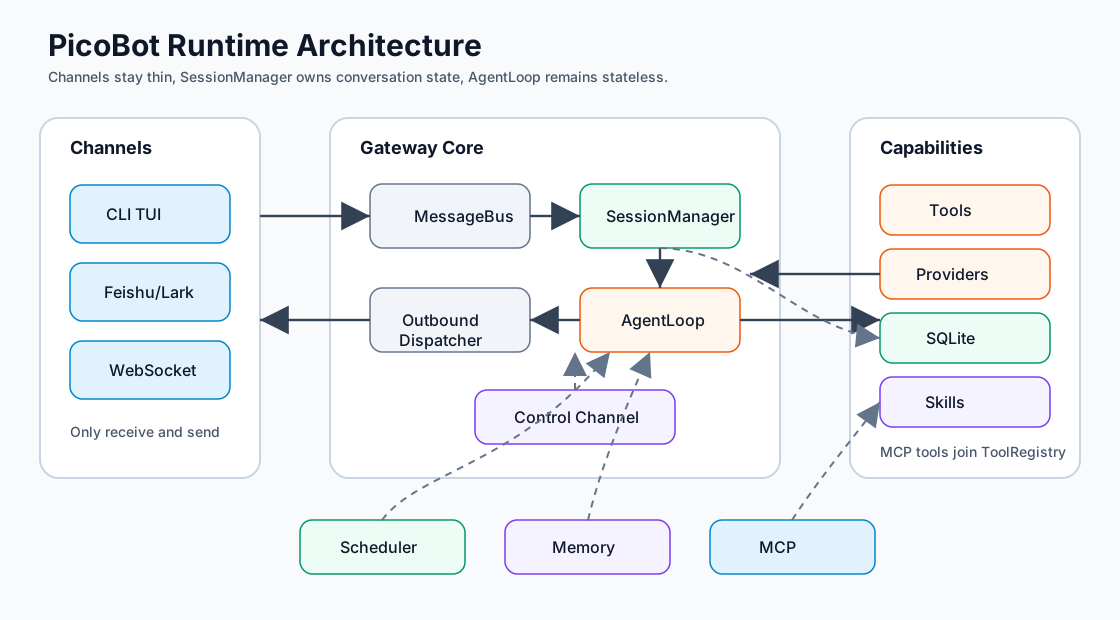
- Created a new SVG diagram for runtime architecture to depict the high-level structure of PicoBot, including channels, gateway, message bus, session manager, agent loop, tools, providers, storage, scheduler, skills, and MCP.
11 KiB
PicoBot
PicoBot 是一个用 Rust 编写的个人 AI 助手运行时。它在本地启动 Gateway,接入 CLI TUI、飞书/Lark 等聊天渠道,把会话、消息、记忆和定时任务持久化到 SQLite,并为 Agent 提供文件、Shell、HTTP、Web、MCP、Skill、记忆、浏览器和子 Agent 等工具能力。
它更像一个可扩展的“个人助手操作系统”:渠道负责收发消息,SessionManager 负责会话和上下文,AgentLoop 负责模型与工具循环,Storage 负责可靠落盘。
适合做什么
- 在终端里和本地 AI 助手持续对话。
- 将同一套 Agent 能力接入飞书/Lark。
- 让 Agent 使用本地文件、Shell、搜索、HTTP、浏览器、MCP 工具完成任务。
- 把长期偏好、事实和历史摘要存成可检索记忆。
- 用 Cron 定时执行任务,并把结果发回目标渠道。
- 通过 Skills 为 Agent 注入项目知识和专用操作指南。
快速开始
1. 准备环境
需要:
- Rust toolchain,项目使用 edition 2024。
- 一个可用的 LLM Provider API Key。
2. 构建项目
cargo build
3. 准备配置
PicoBot 按以下顺序加载配置:
~/.picobot/config.json- 当前目录
./config.json
Gateway 首次启动时会把模板释放到 ~/.picobot/config.example.json。模板源文件在 resources/templates/config.example.json。
最小配置示例:
{
  "providers": {
    "openai": {
      "type": "openai",
      "base_url": "https://api.openai.com/v1",
      "api_key": "<OPENAI_API_KEY>",
      "extra_headers": {}
    }
  },
  "models": {
    "gpt-4o": {
      "model_id": "gpt-4o",
      "temperature": 0.7,
      "max_tokens": 4096,
      "input_type": ["text", "image"]
    }
  },
  "agents": {
    "default": {
      "provider": "openai",
      "model": "gpt-4o",
      "max_tool_iterations": 99,
      "token_limit": 128000
    }
  },
  "workspace_dir": "~/.picobot/workspace"
}
.env 会由 PicoBot 自己解析。配置里的 <OPENAI_API_KEY> 这类占位符会在 .env 和系统环境变量加载后替换。
4. 启动 Gateway
cargo run -- gateway
默认监听 127.0.0.1:19876。Gateway 启动后会把进程工作目录切到 workspace_dir,默认 SQLite 数据库也会写到该 workspace 下的 picobot.db。
5. 启动 CLI 客户端
另开一个终端:
cargo run -- chat
CLI 默认连接 ws://127.0.0.1:19876/ws。如需指定地址,可使用 --gateway-url。
运行时数据流
用户消息进入 PicoBot 后,会被转换为统一的 inbound message,经由 MessageBus 交给 SessionManager。SessionManager 选择当前 dialog、组装上下文、调用 AgentLoop;AgentLoop 调用模型和工具,最终响应通过 outbound bus 回到原渠道。
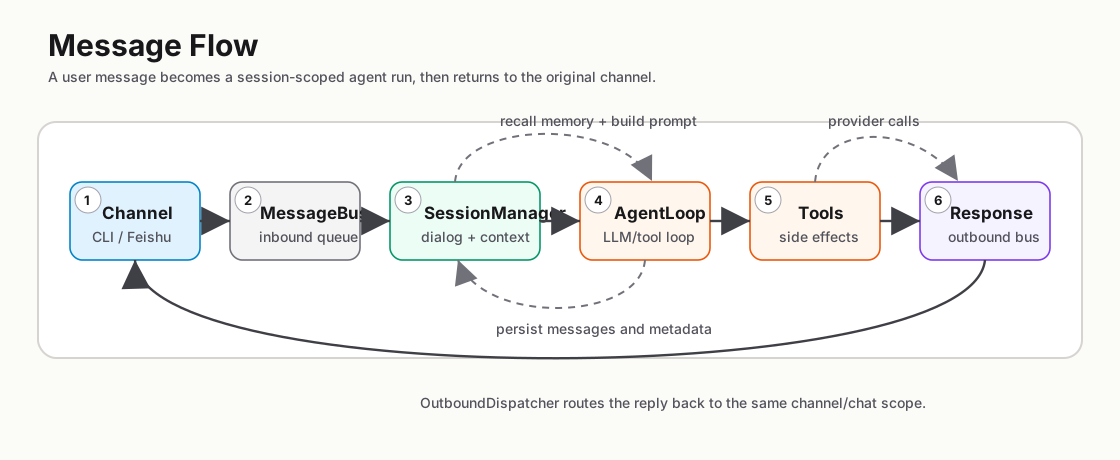
核心边界:
| 模块 | 职责 |
|---|---|
channels |
接入外部渠道,只做收发,不直接处理会话或 LLM |
bus |
异步消息队列,承载 inbound、outbound、control 三类消息 |
session |
管理会话生命周期、dialog 操作、上下文、记忆召回、压缩和持久化 |
agent |
执行无状态 LLM/tool 循环,处理模型响应和工具调用 |
providers |
OpenAI 兼容接口和 Anthropic Messages API 客户端 |
tools |
Agent 可调用工具集合 |
storage |
SQLite schema、CRUD、消息和任务持久化 |
scheduler |
轮询 Cron 任务并把任务 prompt 送入目标会话 |
skills |
加载 Skill,并把 Skill 指南注入系统提示 |
mcp |
连接 MCP Server,将远端工具包装成普通 Tool |
核心能力
渠道
| 渠道 | 说明 |
|---|---|
cli_chat |
Ratatui 终端客户端,通过 WebSocket 连接 Gateway |
feishu |
飞书/Lark 消息、反应、文件上传下载和媒体引用 |
会话
Session ID 使用三段式:
<channel>:<chat_id>:<dialog_id>
同一个 channel:chat_id 下可以有多个 dialog。当前支持的 dialog 操作包括创建、列表、切换、重命名、归档、删除、清空历史、压缩、导出、查看信息和停止任务。
常用 slash commands:
| 命令 | 说明 |
|---|---|
/new |
创建新 dialog |
/sessions |
列出最近 dialog |
/switch <dialog_id> |
切换 dialog |
/rename <title> |
重命名当前 dialog |
/delete |
删除当前 dialog 并创建新 dialog |
/compact |
手动压缩上下文 |
/info |
查看当前 dialog 信息 |
/dump |
导出当前 dialog 为 Markdown |
/mcp |
查看 MCP 服务器和工具状态 |
/stop |
停止当前任务并清空队列 |
/?, /help |
查看帮助 |
记忆
PicoBot 有两类记忆:
| 类型 | 用途 | 生命周期 |
|---|---|---|
| Knowledge | 偏好、事实、项目规则、长期可复用信息 | 长期保留,手动删除 |
| Timeline | 长对话压缩后的历史摘要 | 默认保留 90 天 |
每轮处理用户消息时,MemoryManager 会按用户输入召回最多 memory.recall_limit 条 Knowledge,并注入系统提示。上下文压缩产生的摘要会保存为 Timeline,后续可通过 timeline_recall 工具检索。
工具
基础工具集:
| 工具 | 说明 |
|---|---|
calculator |
数学表达式和统计计算 |
file_read / file_write / file_edit |
文件读写和编辑 |
file_search / content_search |
文件名和内容搜索 |
bash |
在 workspace 中执行 Shell 命令 |
http_request / web_fetch |
HTTP 请求和网页文本抽取 |
get_skill |
列出或读取本地 Skill |
memory_store / memory_recall / timeline_recall / memory_forget |
长期记忆操作 |
delegate |
启动 inline、background 或 parallel 子 Agent |
send_message |
向指定渠道发送消息 |
chat_manager |
查看渠道、会话和历史消息 |
cron_add/list/remove/enable/disable/update |
管理定时任务 |
browser |
可选 WebDriver 浏览器自动化 |
| MCP tools | 从配置的 MCP Server 动态发现并注册 |
Skills
Skill 是包含 SKILL.md 的目录。加载优先级从高到低:
{workspace}/skills~/.picobot/skills~/.agents/skills
同名 Skill 会按高优先级覆盖低优先级。内置 Skill 位于 resources/skills,首次运行时会安装到 ~/.picobot/skills。
配置速查
顶层配置字段:
| 字段 | 说明 |
|---|---|
providers |
LLM Provider 配置 |
models |
模型参数与输入能力 |
agents |
Agent 使用哪个 provider/model |
gateway |
HTTP/WebSocket、数据库、调度器、后台任务限制 |
client |
CLI 客户端默认 Gateway URL |
channels |
渠道配置,目前主要是飞书/Lark |
memory |
记忆召回、归并和 Timeline 保留策略 |
mcp |
MCP Server 配置 |
browser |
可选浏览器自动化配置 |
workspace_dir |
文件工具、Shell、数据库和 workspace skills 的工作目录 |
重要默认值:
| 配置 | 默认值 |
|---|---|
gateway.host |
127.0.0.1 |
gateway.port |
19876 |
gateway.max_concurrent_background_tasks |
10 |
gateway.scheduler.enabled |
true |
client.gateway_url |
ws://127.0.0.1:19876/ws |
memory.recall_limit |
5 |
memory.timeline_retention_days |
90 |
mcp.tool_timeout_secs |
180 |
browser.enabled |
false |
更完整的配置字段说明见 resources/skills/about-picobot/references/config.md。
WebSocket API
Gateway 暴露:
| Method | Path | 说明 |
|---|---|---|
GET |
/health |
健康检查和版本信息 |
GET |
/ws |
WebSocket 聊天协议 |
Inbound 消息类型:
| Type | 主要字段 |
|---|---|
user_input |
content,可选 channel、chat_id、sender_id |
clear_history |
可选 chat_id、session_id |
create_session |
可选 title |
list_sessions |
include_archived |
load_session |
session_id |
rename_session |
可选 session_id,title |
archive_session |
可选 session_id |
delete_session |
可选 session_id |
get_slash_commands |
无 |
ping |
无 |
Outbound 消息类型包括 assistant_response、error、session_established、session_created、session_list、session_loaded、session_renamed、session_archived、session_deleted、history_cleared、slash_commands_list、pong、command_executed 和 system_notification。
测试
# 单元测试
cargo test --lib

# 集成测试需要 tests/test.env 中有真实 API key
cp tests/test.env.example tests/test.env
cargo test --test test_integration -- --ignored
cargo test --test test_tool_calling -- --ignored
cargo test --test test_request_format -- --ignored
集成测试默认 #[ignore],因为它们会真实调用模型 API。
项目结构
src/
  agent/          LLM loop、上下文压缩、系统提示、媒体处理、子 Agent
  bus/            inbound、outbound、control 消息队列
  channels/       CLI chat 和飞书/Lark 集成
  client/         Ratatui 终端 UI
  config/         配置加载、环境变量替换、路径展开
  gateway/        Axum HTTP/WebSocket server 和 GatewayState 装配
  mcp/            MCP 客户端连接和工具包装
  memory/         记忆管理和记忆类型
  observability/  Agent/tool telemetry observer
  providers/      OpenAI 兼容和 Anthropic provider
  scheduler/      定时任务运行时
  session/        会话生命周期、dialog 命令、持久化集成
  skills/         Skill 加载和内置 Skill 安装
  storage/        SQLite schema 和 CRUD
  tools/          Agent 工具实现
resources/
  skills/         构建时嵌入的内置 Skills
  templates/      首次运行释放的配置和用户模板
tests/            单元测试和 ignored 集成测试
docs/             分析报告、文档插图和补充资料
关键依赖
| Crate | 用途 |
|---|---|
axum, tokio, tokio-tungstenite |
Gateway 和 WebSocket runtime |
sqlx |
SQLite 持久化 |
reqwest |
LLM 和 HTTP 客户端 |
ratatui, crossterm, termimad |
终端 UI |
rmcp |
MCP 客户端 |
fantoccini |
可选浏览器自动化 |
cron, chrono-tz |
定时任务 |
jieba-rs |
中文记忆检索分词 |
zstd, tar |
内置 Skill 打包和释放 |